
Scientific Coding with Python
Part 2: Lists, Operators, and Loops
A physics experiment rarely involves only one measurement. We may record positions at different times, compare repeated trials, or calculate kinetic energies for a range of speeds. Defining a separate variable for every value and writing the same calculation repeatedly becomes cumbersome as the dataset grows.
Lists, conditional statements, and loops make this work easier. Let us continue where we left off.
1. Lists in Python
Imagine that we have made five measurements of gravitational acceleration, in . Instead of defining a separate variable for each measurement, we can collect them in a list:
measurements = [9.7, 9.8, 9.9, 9.8, 10.0]

print(measurements)
print(len(measurements))
Output:
[9.7, 9.8, 9.9, 9.8, 10.0]
5
Lists are created with square brackets, and their elements are separated by commas. len() returns the number of elements in a list.
Lists preserve element order, allow repeated values, and can be modified after creation. Here, “ordered” does not mean sorted from smallest to largest; it means that each element has a particular position in the list.
Accessing List Elements
The number identifying an element's position is called its index. Python indices start at zero.
measurements = [9.7, 9.8, 9.9, 9.8, 10.0]

print(measurements[0])
print(measurements[2])
print(measurements[-1])
Output:
9.7
9.9
10.0
measurements[0] gives the first element, while measurements[2] gives the third. Negative indices access elements from the end; -1 refers to the last element.
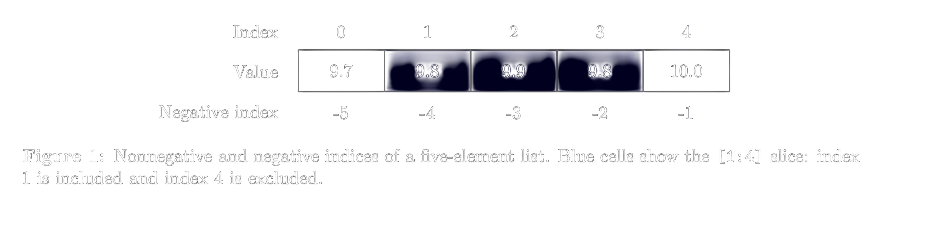
The nonnegative indices of this five-element list run from 0 to 4. Writing measurements[5] attempts to access a position outside the list and raises an IndexError.
Selecting Part of a List with Slicing
Sometimes we need only a portion of the measurements. We can select it with a slice:
measurements = [9.7, 9.8, 9.9, 9.8, 10.0]

print(measurements[1:4])
print(measurements[:3])
print(measurements[::2])
Output:
[9.8, 9.9, 9.8]
[9.7, 9.8, 9.9]
[9.7, 9.9, 10.0]
The general form is items[start:stop:step]. The start index is included, but the stop index is excluded.
Thus, [1:4] selects elements at indices 1, 2, and 3. The slice [:3] selects the first three elements, and [::2] selects every second element from beginning to end.
Figure 1 shows how slicing corresponds to list indices.
Changing, Adding, and Removing Elements
Suppose the first measurement was recorded incorrectly and should have been 9.6. Let us correct it and then add another measurement:
measurements = [9.7, 9.8, 9.9, 9.8, 10.0]

measurements[0] = 9.6
measurements.append(9.9)

print(measurements)
Output:
[9.6, 9.8, 9.9, 9.8, 10.0, 9.9]
append() adds an element to the end of a list. To remove the last element and keep its value, we can use pop():
removed = measurements.pop()

print(removed)
print(measurements)
Output:
9.9
[9.6, 9.8, 9.9, 9.8, 10.0]
This example continues the preceding code block. Writing pop(2) would remove the third element. In contrast, remove(9.8) searches by value rather than index and removes the first occurrence of 9.8.
Be Careful When Copying Lists
We may want to keep a copy before changing our measurements. However, the following assignment does not create a new list:
measurements = [9.7, 9.8, 9.9]
backup = measurements

backup[0] = 0

print(measurements)
Output:
[0, 9.8, 9.9]
Both variables refer to the same list, so a change through one is also visible through the other. For a list of numbers like this one, we can create an independent copy with copy():
measurements = [9.7, 9.8, 9.9]
backup = measurements.copy()

backup[0] = 0

print(measurements)
print(backup)
Output:
[9.7, 9.8, 9.9]
[0, 9.8, 9.9]
For nested lists, copy() copies only the outer list. Since we are currently using flat lists of numbers, this method is sufficient.
2. Operators
Operators are symbols and keywords that let us perform operations on values or compare them.
The following table summarizes the basic arithmetic operators:
| Operation | Operator | Example | Result |
|---|---|---|---|
| Addition | + | 7 + 2 | 9 |
| Subtraction | - | 7 - 2 | 5 |
| Multiplication | * | 7 * 2 | 14 |
| Division | / | 7 / 2 | 3.5 |
| Floor division | // | 7 // 2 | 3 |
| Remainder | % | 7 % 2 | 1 |
| Exponentiation | ** | 7 ** 2 | 49 |
The // operator rounds the quotient down to an integer. For negative numbers, this is not the same as simply removing the fractional part: -7 // 2 evaluates to -4.
The % operator can be used to check whether an integer is even. An integer is even if dividing it by two leaves a remainder of zero:
number = 8

print(number % 2 == 0)
Output:
True
Remember the difference between = and ==. The first assigns a value, while the second checks whether two values are equal.
Updating a Value
To increase a running total, we can write:
total = 10
total = total + 5

print(total)
The same operation has a shorter form:
total = 10
total += 5

print(total)
Both examples produce 15. Numeric variables also support -=, *=, and /=.
Logical Operations and Membership
To evaluate several conditions together, we use and, or, and not:
and: Both conditions must be true.or: At least one condition must be true.not: Reverses the truth value of the condition.
For example, let us check whether a temperature is within our chosen operating range:
temperature = 23

print(temperature >= 20 and temperature <= 25)
print(not (temperature > 25))
Output:
True
True
We can check whether a value occurs in a list with in:
measurements = [9.7, 9.8, 9.9]

print(9.8 in measurements)
print(10.0 not in measurements)
Both expressions evaluate to True.
3. Conditional Statements: if, elif, and else
Now let us make our program perform different actions depending on a condition.
Consider the velocity component of a particle along one axis. A positive value indicates motion in the positive direction, and a negative value indicates motion in the negative direction:
velocity = -3.0

if velocity > 0:
    print("The particle moves in the positive direction.")
elif velocity < 0:
    print("The particle moves in the negative direction.")
else:
    print("The velocity component on this axis is zero.")
Output:
The particle moves in the negative direction.
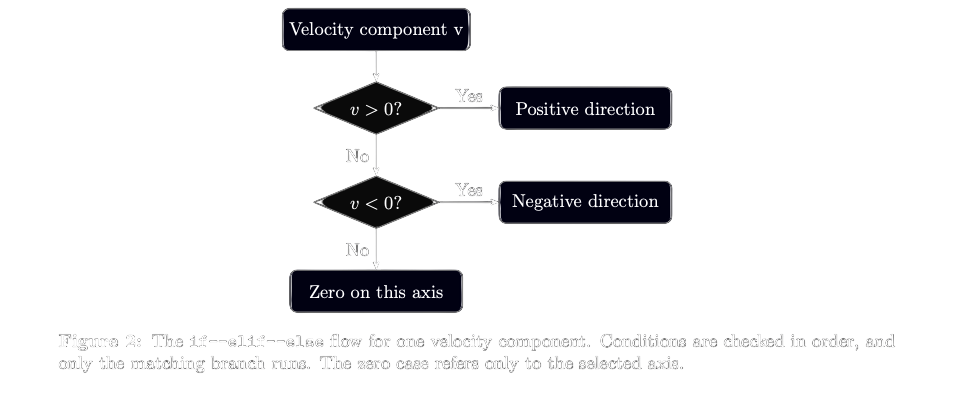
Python first checks the if condition. If it is false, it checks the elif condition. If that is also false, it executes the else block.
Indentation is part of the code. We usually write the lines that will run conditionally with four spaces and indented inward. Do not forget the : at the end of each branch header.
The decision sequence is illustrated in Figure 2.
4. The for Loop: Applying an Operation to Several Values
A for loop processes the elements of a list in sequence:
measurements = [9.7, 9.8, 9.9]

for measurement in measurements:
    print(measurement)
Output:
9.7
9.8
9.9
On each iteration, measurement takes the next value in the list. The same print() statement therefore runs once for every element.
Example: Calculating Kinetic Energy
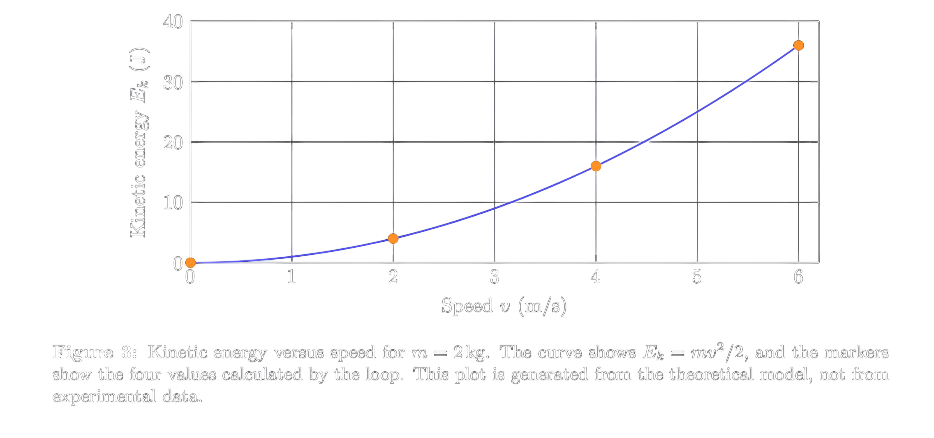
Let us calculate the kinetic energy of a body of mass 2 kg at several speeds. In classical mechanics, kinetic energy is given by
Using speeds in m/s gives energies in joules.
mass = 2.0
speeds = [0, 2, 4, 6]
energies = []

for speed in speeds:
    energy = 0.5 * mass * speed ** 2
    energies.append(energy)

print(energies)
Output:
[0.0, 4.0, 16.0, 36.0]
We first created an empty energies list. On each iteration, we calculated the energy for one speed and appended the result.
There is also a physical result to observe: increasing the speed from 2 m/s to 4 m/s raises the energy from 4 J to 16 J. Doubling the speed quadruples the kinetic energy.
Figure 3 displays this quadratic relationship alongside the calculated values.
Choosing the Number of Iterations with range()
Even without an existing list, we may want to repeat a calculation a specified number of times:
for number in range(1, 6):
    print(number ** 2)
Output:
1
4
9
16
25
range(1, 6) starts at 1 and stops before 6. Its general form is range(start, stop, step).
print(list(range(0, 10, 2)))
Output:
[0, 2, 4, 6, 8]
Here, we advance in steps of two. We used list() to display the values represented by range as a list. range() uses integers; later parts will introduce other ways to work with fractional time steps.
5. The while Loop: Repeating While a Condition Holds
A while loop runs as long as its condition is true. Let us sum the integers from one to five:
counter = 1
total = 0

while counter <= 5:
    total += counter
    counter += 1

print(total)
Output:
15
On each iteration, we added the counter to the total and then increased the counter by one. When it reached 6, the condition became false and the loop ended.
If we remove counter += 1, the counter stays at 1. The condition then never becomes false, and the loop does not finish on its own. Always consider how a while condition will change.
break and continue
Two additional statements help us control loops:
break terminates its enclosing loop. For example, let us find the first temperature above in a list:
temperatures = [22, 35, 48, 83, 91]

for temperature in temperatures:
    if temperature > 80:
        print("Limit exceeded:", temperature)
        break
Output:
Limit exceeded: 83
The loop ends when it finds 83; the next value is not examined.
continue does not terminate the loop. It skips the remaining statements in the current iteration and moves on to the next one. We will use it in the measurement example below.
6. Tuples
Tuples also store several values together. Unlike lists, their elements cannot be replaced after the tuple has been created.
Let us represent a particle's three-dimensional position, in metres, as a tuple:
position = (2.0, -1.0, 4.0)

print(position[0])

x, y, z = position
print(x, y, z)
Output:
2.0
2.0 -1.0 4.0
The statement x, y, z = position unpacks the tuple into separate variables. We can then use each component by its own name.
Assigning position[0] = 5.0 is not allowed and raises a TypeError. To represent a new position, we can create a new tuple.
The comma matters when defining a one-element tuple:
single_value = (5,)
number = (5)

print(type(single_value))
print(type(number))
Output:
<class 'tuple'>
<class 'int'>
Parentheses alone do not create a tuple.
A list suits a collection from which we will add or remove measurements. A tuple can represent a record whose components belong together, such as coordinates. The choice depends on how we intend to use the data.
7. Putting It Together: Evaluating Measurements
Let us combine lists, conditions, and loops in one example.
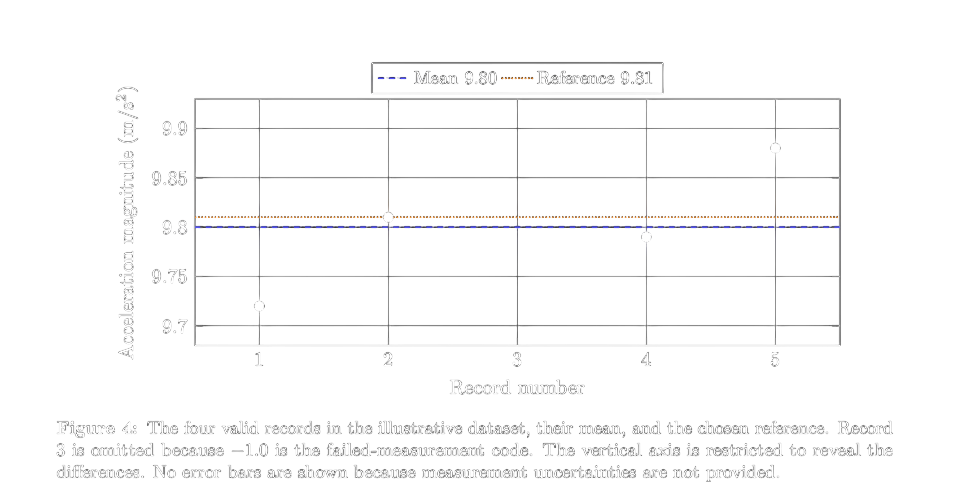
Suppose we obtained the following values in an experiment measuring the magnitude of gravitational acceleration. For this example, assume that the instrument records a failed measurement as -1.0, and that we reject zero or negative records. This is a rule for this example, not a general rule for all physical measurements.
measurements = [9.72, 9.81, -1.0, 9.79, 9.88]
valid_measurements = []

for measurement in measurements:
    if measurement <= 0:
        continue

    valid_measurements.append(measurement)

if len(valid_measurements) > 0:
    mean = sum(valid_measurements) / len(valid_measurements)

    reference = 9.81
    percentage_deviation = abs(mean - reference) / reference * 100

    print("Valid measurement count:", len(valid_measurements))
    print(f"Mean: {mean:.2f} m/s²")
    print(f"Percentage deviation from reference: {percentage_deviation:.2f}%")
else:
    print("No valid measurements are available.")
Output:
Valid measurement count: 4
Mean: 9.80 m/s²
Percentage deviation from reference: 0.10%
The program skipped the invalid record and calculated the mean of the remaining four measurements. Checking that the list was not empty before taking the mean also prevented division by zero.
abs() returns the absolute value of a number. Here, we used it to find the magnitude of the difference between the mean and the chosen reference.
The f before the opening quotation mark lets us insert values into a string. The expression {mean:.2f} displays a number with two digits after the decimal point. This formatting does not change the value used in the calculation.
The percentage deviation describes how far the mean is from the chosen reference. It is not, by itself, the measurement uncertainty; that requires information such as the spread of measurements and the instrument's characteristics.
Figure 4 shows that individual records differ even when their mean is close to the reference.
8. A First Step into NumPy
We have stored values in lists and calculated results with loops. Scientific work, however, may involve much larger numerical datasets. NumPy is a library for performing calculations on numerical arrays.
First, let us look at an important distinction:
numbers = [1, 2, 3]

print(numbers * 2)
Output:
[1, 2, 3, 1, 2, 3]
Multiplying a list by 2 does not multiply each value by two; it repeats the list.
For a NumPy array, numerical multiplication applies element by element. The following example requires NumPy to be installed in the Python environment being used:
import numpy as np

numbers = np.array([1, 2, 3])

print(numbers * 2)
Output:
[2 4 6]
import numpy as np imports NumPy and gives it a short alias. np.array() creates a NumPy array from the supplied list.
We can also rewrite the kinetic-energy example as follows:
import numpy as np

mass = 2.0
speeds = np.array([0, 2, 4, 6])

energies = 0.5 * mass * speeds ** 2

print(energies)
Output:
[ 0. 4. 16. 36.]
This applies the same calculation to every array element without writing an explicit for loop.
In this part, we learned to store multiple values, execute statements conditionally, and repeat calculations. We can now move beyond calculating a single result and evaluate a small collection of measurements.
To experiment further, change the mass in the kinetic-energy example, then try displaying only energies greater than 10 J.
In the next part, we will use functions to make calculations reusable, explore NumPy arrays in greater detail, and plot our results with Matplotlib. This will let us inspect physical behaviour visually as well as numerically.
Until next time, happy coding.
References and Further Reading
- Yusuf Olçun, Python ile Bilimsel Kodlama 1. Bölüm [Scientific Coding with Python, Part 1], Biricik Bilim. https://biricikbilim.com/makale/python-ile-bilimsel-kodlama-bolum-1
- Python Software Foundation, Data Structures. https://docs.python.org/3/tutorial/datastructures.html
- Python Software Foundation, More Control Flow Tools. https://docs.python.org/3/tutorial/controlflow.html
- NumPy, The Absolute Basics for Beginners. https://numpy.org/doc/stable/user/absolute_beginners.html